Choosing a touch-free dental unit in 2026 requires more than comparing product photos or counting automated functions. The real question is: What are the benefits of a touch-free dental unit in daily clinical work? A well-designed system can reduce contact with handles, switches, and control panels. It may also support cleaner workflows between patients. However, touch-free technology is not a substitute for verified disinfection procedures, staff training, or careful maintenance.
Dr. John A. Molinari, a widely recognized dental infection-control expert, states, “Every touch point deserves a safer design.” This principle is practical. A clinician can adjust chair positions with a foot control while wearing gloves. An assistant can activate water functions without touching a contaminated surface. These small moments matter when a busy operatory has limited space, wet gloves, and repeated patient turnover.
Still, choosing correctly is not always simple. Some sensors respond slowly. Others activate when staff move unexpectedly nearby. That can disrupt treatment. A system may look advanced but provide weak cleaning access around its sensors and seams. Buyers should examine response accuracy, emergency controls, sterilization compatibility, service support, and replacement-part availability. Ask for a live demonstration.
The best unit should feel predictable, not impressive for one afternoon. It should fit the clinic’s procedures, patient volume, and staff habits. Even experienced teams can overlook usability. That deserves reflection. In this guide, we examine the features, risks, maintenance needs, and purchasing questions that can shape a confident 2026 decision.
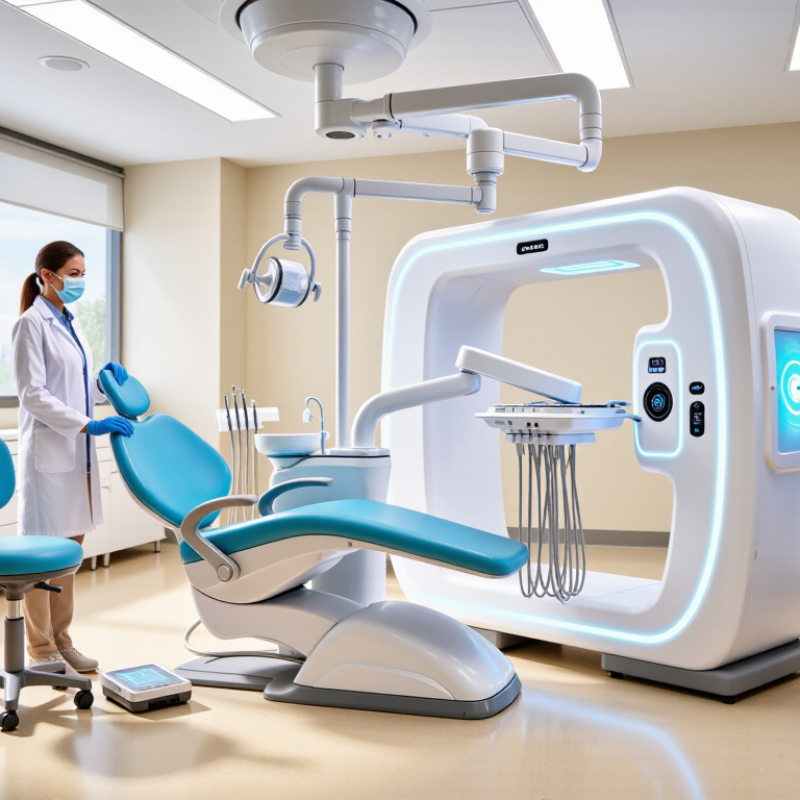
A touch-free dental unit is a chairside system that lets clinicians operate selected functions without pressing shared buttons or handles. Depending on its design, it may include motion sensors for the operating light, water controls, or instrument delivery. When a hand moves near a sensor, the unit detects that movement and activates the linked function. Some systems use foot controls instead, so staff can adjust equipment while keeping their hands free. The exact features vary. Check the technical specifications rather than assuming every function is contactless.
In a busy treatment room, a sensor-controlled light can turn on as a clinician approaches the chair. A hands-free rinse control may reduce contact around the cuspidor. Small changes matter. Still, “touch-free” does not mean every surface stays untouched. Clinicians handle instruments, positioning controls, and other equipment during care, and sensors need cleaning and maintenance too. A sensor can also misread movement or respond at the wrong moment. That can be frustrating. When evaluating a unit, consider whether sensors respond reliably from the usual working positions, and whether staff can operate key functions manually if needed. Touch-free controls can support a cleaner workflow, but they do not replace routine disinfection or careful clinical practice.
How To Choose a Touch Free Dental Unit in 2026?
Hygiene should guide the purchase, not the novelty of touch-free controls. A reliable dental unit should support sensor activation for water, rinsing, lighting, and suction where practical. Hands-free operation can reduce contact with contaminated surfaces. It does not replace proper hand hygiene or barrier protection. Choose smooth, sealed surfaces with minimal joints. They should tolerate approved disinfectants without cracking, clouding, or becoming sticky.
Waterline safety needs closer attention. Look for accessible flushing controls, anti-retraction protection, and clear maintenance instructions. Components exposed to patient fluids should be removable or sterilizable according to their instructions for use. Check whether tubing, valves, and suction parts can be inspected without dismantling half the unit. That matters during a busy afternoon. A touch-free unit is not automatically safer. This is an easy assumption, and it can be wrong. Infection-control performance depends on daily behavior, training, and documented servicing.
Tips: Test the sensors while wearing gloves. Can staff activate them without awkward movements? Ask for cleaning compatibility data, waterline treatment guidance, and service records. Confirm that alerts are visible from the operator’s position. Review current dental infection-prevention guidance before purchasing. Also watch for false activation. A sensor that starts water when a hand passes nearby creates waste and extra cleaning. Small details matter.
| Feature or criterion | What to look for | Why it matters | How to verify it before purchase |
|---|---|---|---|
| Hands-free chair and instrument controls | Foot control and, where useful, touchless sensors for chair positioning or selected functions. Confirm that controls can be operated reliably with gloved hands or without hand contact. | Reducing unnecessary contact with shared control surfaces can support a cleaner workflow, but does not replace cleaning and disinfection. | Test the controls during a simulated procedure. Ask which functions are touchless, how sensors are activated, and how their surfaces are cleaned between patients. |
| Dental unit water quality | A documented waterline treatment and monitoring program that can consistently meet the drinking-water standard of no more than 500 CFU/mL of heterotrophic bacteria. | Dental unit waterlines can develop biofilm. A treatment system alone is not proof that water quality meets the recommended standard. | Request the waterline treatment instructions, monitoring method, test frequency, and sample records. Confirm that the process is compatible with the unit and the clinic’s water source. |
| Waterline treatment and maintenance | Clearly documented procedures for routine treatment, testing, flushing, and corrective action when a result exceeds the clinic’s target. | Consistent maintenance is essential because biofilm can persist inside narrow waterline tubing. | Check that staff can follow the procedures without relying on undocumented steps. Confirm consumables, maintenance intervals, and service requirements in the instructions for use. |
| Sterile water delivery for surgery | A separate delivery method that bypasses the dental unit waterlines and supplies sterile water or sterile saline when required for surgical procedures. | Routine dental unit water is not sterile. CDC guidance calls for sterile irrigating solutions delivered through an appropriate sterile system for surgical procedures involving bone. | Verify the separate sterile-fluid pathway, compatible tubing and components, setup instructions, and the procedure for maintaining sterility. |
| Anti-retraction protection | Anti-retraction valves or another documented design intended to limit the backflow of oral fluids into handpiece tubing. | Backflow may contribute to contamination of dental unit waterlines. Anti-retraction features do not eliminate the need for waterline treatment and monitoring. | Ask for the manufacturer’s description of the mechanism, maintenance requirements, and any applicable testing or replacement instructions. |
| Between-patient flushing | A practical procedure for discharging water and air from devices connected to the dental water system after each patient. | CDC guidance recommends discharging water and air for at least 20–30 seconds after each patient from devices connected to the dental water system. | Confirm which outlets are included, whether the procedure is manual or automated, and that staff can perform it in line with current guidance and the unit’s instructions. |
| Automated purge or cleaning cycles | Clearly described cycles with defined connections, sequence, duration, and required treatment products. | Automation can help standardize a workflow, but a purge cycle should not be assumed to remove established biofilm or replace waterline treatment and testing. | Ask for written cycle instructions and clarify exactly what the cycle does and does not do. Confirm any required daily, weekly, or periodic manual steps. |
| Cleanable surfaces and barriers | Smooth, accessible surfaces around the headrest, handles, control panels, light handles, and other frequently touched areas; removable barriers where appropriate. | Touch-free operation reduces some contacts, but clinical contact surfaces still require protection or cleaning and disinfection between patients. | Review the cleaning instructions and verify compatibility with the disinfectants used in the practice. Check that surfaces and joints are accessible for wiping. |
| Suction and evacuation components | Accessible, clearly identified suction connections and documented procedures for cleaning and maintaining evacuation lines and removable components. | Effective, consistent handling of suction equipment is part of routine infection-prevention practice. | Review the unit’s instructions for cleaning, disinfection, and maintenance. Confirm which components are removable and which products are compatible. |
| Instructions, training, and records | Clear instructions for use, staff training materials, maintenance schedules, and a practical way to record water testing and required maintenance. | Reliable infection-control performance depends on both equipment design and correct, consistent use. | Ask for the current instructions and sample maintenance logs. Identify who will perform each task and how staff will be trained after installation. |
Selection note: Touch-free controls can reduce some surface contacts, but they do not make a dental unit self-disinfecting. Follow current local regulations, CDC guidance where applicable, and the unit’s instructions for use for cleaning, disinfection, waterline treatment, and monitoring.
When comparing touchless dental units, examine the control method before the feature list. Foot controls keep hands away from contaminated surfaces during treatment. Gesture controls can adjust water flow, chair position, or light intensity. They must respond quickly without reacting to accidental movements.
Sensor placement matters. A proximity sensor near the basin may trigger when a sleeve passes by. That creates interruptions and wastes water. Test the unit while wearing gloves, a gown, and protective eyewear. Check whether staff can clean the sensor without damaging its surface. Small details reveal practical quality.
Automation should support clinical judgment, not replace it. Look for adjustable sensitivity, clear feedback, and a manual override. The system should stop safely after an unexpected command. Ask for maintenance records, calibration instructions, and documented electrical safety testing. Training should include common faults, not only normal operation. No sensor is perfect. A failed gesture command can slow treatment, while a false activation can distract the clinician. It is tempting to choose the most automated unit. A simpler interface may prove more reliable in a busy surgery. My own evaluation would also include noise, glove compatibility, and how quickly staff learn the controls. That last point is easy to underestimate.
Compatibility should be checked before discussing touchless controls. Measure the room’s electrical supply, compressed-air pressure, water inlet, drainage, suction, and network points. Confirm chair, light, scaler, curing device, and imaging-system connections. A unit that fits physically may still disrupt the operatory. During clinical evaluations, I would request a live installation test, not only a specification sheet. Ask for documented electrical protection, emergency stops, sensor response times, and software-failure behavior. Small details matter.
Safety must include water quality and cleaning access. The CDC’s Summary of Infection Prevention Practices in Dental Settings states that dental treatment water should meet drinking-water standards, including fewer than 500 CFU/mL of heterotrophic bacteria. Check how the unit treats and monitors its waterlines. Touch-free sensors also need smooth, disinfectant-resistant surfaces. Poorly positioned sensors can trigger unintended movements. That is not theoretical. A gloved hand, suction tube, or bright operatory light may activate them. Test those conditions repeatedly.
Clinical workflow is the practical filter. The WHO Global Oral Health Status Report 2022 estimates that nearly 3.5 billion people live with oral diseases, increasing pressure on efficient dental care. Watch a complete procedure, from patient entry to instrument reprocessing. Can clinicians adjust the chair without turning away? Can assistants control suction and lighting without crossing the sterile field? Review the manufacturer’s validated cleaning instructions, as recommended by FDA reprocessing guidance. I would also ask staff to score fatigue, delays, and accidental activations after several sessions. The first trial can look impressive. It may still hide workflow problems.
Purchase price is only the visible cost. Request a five-year ownership estimate before choosing a touch-free dental unit. Include installation, sensor calibration, filters, replacement valves, software updates, staff training, and expected downtime. A cheaper unit may become expensive when one failed sensor stops a busy operatory.
Maintenance design matters. Ask whether staff can access filters and tubing without dismantling the unit. Confirm service intervals, spare-part availability, and diagnostic alerts. The CDC recommends dental unit water output meet the drinking-water standard of fewer than 500 CFU/mL. Therefore, examine waterline treatment and flushing procedures, not only touchless controls. Convenience is not infection prevention.
Labor also shapes long-term value. The U.S. Bureau of Labor Statistics reported median annual pay of 87,530 dollars for dental hygienists in May 2023. Even small delays can carry real operating costs. Measure setup time with your own team. Do not trust a brochure alone. A practical trial should record instrument access, cleaning time, false sensor triggers, and recovery after power loss. I would also leave room for uncertainty. New interfaces can reduce contact, yet they may create unfamiliar maintenance habits. The best choice is the unit your staff can operate consistently, inspect easily, and repair without prolonged disruption.
Compare the control method before counting features. Foot controls keep hands away from contaminated surfaces. Gesture controls can adjust water, chair position, or light intensity. More automation is not always better.
Test the unit with gloves, a gown, and protective eyewear. Move a sleeve near the basin and watch for false activation. Check response speed during normal treatment. Test it live.
Poor placement may detect passing sleeves instead of deliberate gestures. This can waste water and distract the clinician. Ask staff to clean the sensor without damaging its surface. Small details matter.
Look for adjustable sensitivity, clear feedback, and a manual override. The unit should stop safely after an unexpected command. Ask for electrical safety records and calibration instructions. No sensor is perfect.
Ask whether staff can reach filters and tubing without dismantling the unit. Confirm service intervals, spare-part access, and diagnostic alerts. A failed sensor may stop a busy treatment room. That cost is easy to miss.
Include installation, calibration, filters, replacement valves, software updates, training, and downtime. The purchase price shows only part of the expense. A cheaper unit may become costly later. I would leave room for uncertainty.
Run a practical trial with your own team. Record setup time, cleaning time, false triggers, and recovery after power loss. Measure instrument access during ordinary work. Brochures cannot show every awkward moment.
Examine waterline treatment and flushing procedures, not touchless controls alone. Output should meet the drinking-water standard of fewer than 500 CFU/mL. Convenience does not equal infection prevention. It is a separate check.
Choosing a touch-free dental unit in 2026 requires more than selecting a system with automatic controls. A touch-free unit uses sensors, voice commands, foot controls, or programmed automation to reduce physical contact during treatment. When comparing options, focus on hygiene and infection-control features such as smooth disinfectable surfaces, easy-to-clean components, separated water pathways, and effective contamination prevention. Also assess how accurately the sensors respond, whether controls can be customized, and whether automation supports rather than interrupts the clinician’s workflow.
What are the benefits of a touch-free dental unit? It can help reduce unnecessary surface contact, support more consistent clinical procedures, improve convenience, and save time during routine tasks. Before purchasing, verify compatibility with existing equipment, electrical and water safety, installation requirements, and staff training needs. Finally, consider the total cost of ownership, including maintenance, replacement parts, software updates, cleaning time, and expected service life. The best choice balances infection control, intuitive operation, safety, durability, and long-term value.

Barclay Medical